Residents
Manage who comes to your unit from your phone: visitors, vendors, vehicles and passes.
- Pre-book visitors and get notified when they arrive
- Tell the gatehouse when you'll be away
Motion VMS is Motion Kulca's visitor management system for estates, complexes and gated communities. Residents use the Motion app to pre-book visitors, pre-approve vendors, register their vehicles and issue QR-code passes, so the gatehouse knows who to expect.
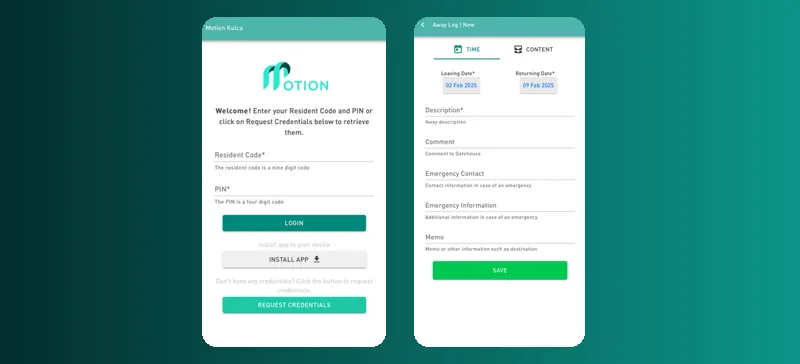
Residents sign in with the resident code and PIN for their unit. Don't have them? Tap “Request credentials” on the sign-in screen.
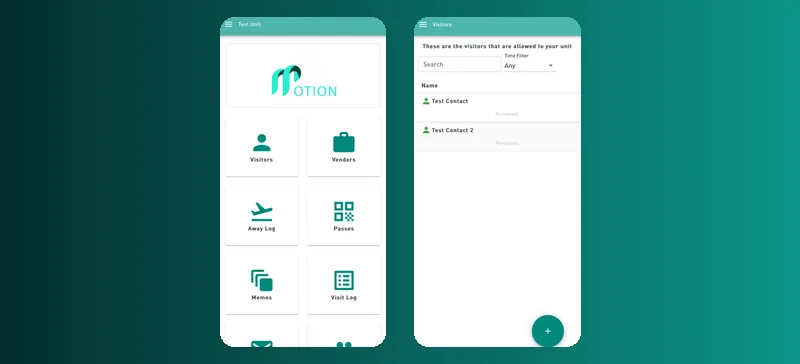
Motion VMS scales to suit your estate or complex, from a single entrance to a larger community.
Manage who comes to your unit from your phone: visitors, vendors, vehicles and passes.
The guardhouse checks pre-approvals on arrival before granting access, and receives parcels and mail for residents.
Share memos, newsletters and general information with residents, and list the amenities they can book.
Pre-book visitors with dates, times, visitor type and contact number, add notes for the gatehouse, and choose whether to be notified on arrival.
Add your vehicles so access can be granted by scanning the number plate. Make sure the licence plate you enter is accurate.
Pre-approve service providers such as scholar transport, e-hailing services and couriers, or add one manually if it isn't listed.
Create QR-code passes for gardeners, young children and others. Set the duration and pass code, and view the history of passes issued.
Let the gatehouse know when you'll be away, and which items they should receive or hold for you.
See parcels and mail received at the gatehouse, what was delivered and when it was picked up.
See the amenities in your community, such as a pool house, tennis court, boardroom, braai area, study centre, gym or laundry, and book them.
Pick a date range to see the visitors and vendors who came to your unit.
Read memos, newsletters and general information from your community leaders.
See which guard is on duty at the gatehouse now, and who works there at other times.
Keep your details up to date, choose your notifications, add emergency contacts and say whether the gatehouse may receive parcels for you.
Request technical assistance straight from the app.
Go to motion.gateaccessapp.com on your phone.
On Android, open it in Chrome, tap the three dots and choose Install app or Add to Home. On iPhone, use Safari.
Enter your resident code and PIN, or tap “Request credentials” to retrieve them.
To pick visitors from your contact list on an iPhone, turn on Safari's Contacts Picker:
Having trouble installing? Contact us on WhatsApp for support.
Call our office, WhatsApp us, or book a demo and we'll call you back.
Office: 087 711 0020 Mobile: 083 216 6075 WhatsApp 083 216 6075 info@motionkulca.co.za